Monday, October 3, 2011

Making a Notecard for Huddles


Making a Notecard for Huddles 111003


Notecards are used in the Huddles EZ Animator Delux to do two things:

  1. Put dances in the order you want them
  2. To make choreographed Dance Sequences
This notecard is to help you make your first notecard to put dances in the order you want them.

=====

HOW TO CREATE A NOTECARD

Open your inventory by clicking on the Inventory button in the bottom of your screen (Firestorm). Select the folder in inventory where you want to place the notecard. I use the same folder as my Huddles HUD. Right click on the folder name and you see a drop down menu ... select 'New Note.' This opens a note and selects the note in yout inventory so you can name the note. Let's use the name 'PRACTICE 1.' The name is important since this is the name that you will see in your HUD.

Once you have named your notecard, you see the notecard on your screen and it is blank. The top line is the title and I usually title it the same at the notecard name 'PRACTICE 1.'

=====

DESIGN OF THE NOTECARD

Since the notecard lets you arrange dances in the order you want and lets you use dance sequences, the first thing is to think about how to organize the card.

One dance or sequence is used per line. Since your Huddles HUD displays only 10 dances or sequences at one time, you need to think in terms of groups of ten.

I have put my HUD in the general order of SLOW, MEDIUM, FAST for the dances and sequences. Since I have so many dances I even put the speed on each display page.

In each group of ten I put four things:

  1. line 1 - Sultry Down body - this is the transition dance to be used between dances that don't match well or at the end of a song
  2. line 2 - I put the words SLOW, MEDIUM or FAST here with a modifier sometimes like MALE or SPECIAL. This helps me know what kind of dances are on the display page.
  3. lines 3 through 9 - Here I put dances or sequences, which are discussed below.
  4. line 10 - Here I put rythm6 which is my between songs dance.

At the DANCE QUEENS Free Stuff Box you can get a copy of a Notecard without the dances in the 3 through 9 position so you can see what it looks like ... it is 'DANCE QUEENS - Notecard Sample 1A for Huddles.'

=====

LOADING YOUR FIRST NOTECARD

Put 'DANCE QUEENS - Notecard Sample 1A for Huddles' in your HUD and take a look at it. To do this, DETACH your HUD. Rezz it on the ground. Edit the HUD and select contents. This is the same process you use to add dances to the HUD. Rezzing your HUD is the riskiest operation you can do with it. I try to do it on land where I can rezz, where I know the owner if something happens, and with a direct not wireless connection. The contents of my HUD cost me about USD 4000 and maybe 4000 hours of work. It is really valuable to me. Yours will be too, so protect it. I've set up a spot at Dance Central for you to do this.

Once the contents show, click and hold on the notecard and slide the cursor to the contents area of your HUD, then release the mouse button.

Once you have added the notecard and/or dances, close the editing window, take your HUD back to inventory and wear it. DO NOT WEAR YOUR HUD DIRECTLY FROM THE GROUND. You have to load the new or revised Notecard using the diskette button. Clicking this button gives you a listing of notecards. Select 'DANCE QUEENS - Notecard Sample 1 for Huddles' and the notecard loads in your HUD.

The default position is the first ten lines, which should display Sultry Down Body on the TOP line, SLOW as the second line, and rythm6 at the bottom.

Some important points:

  1. Keep a copy of your notecard in inventory. I make changes in the inventory notecard and load or change the notecard in the HUD by copying the notecard from inventory.
  2. Use different notecards for special situations. I sometimes host an event called LATE NIGHT SOMEWHERE. I have a notecard for this event with only dances that look like I am singing on a stage. I have a separate notecard for DANCE QUEEN demos. I actually have about 10 notecards loaded in my HUD ... all with different names.
  3. If you click on the second line which has the name of the display group, you will see in Green in Chat the name, for example, SLOW. The HUD does this when it cannot find the dance with the name.
  4. Look at the notecard in inventory. Notice that each blank line has a space bar space. This is necessary for the HUD to recognize the blank line as blank. If you do not put anything on the line, the HUD interprets it as nothing. This messes up your dance order. To be sure my spacing is correct I check the last display page to be sure Sultry Down Body is at the top.


=====

LOADING DANCES

Putting dances in your HUD is just like putting in the Notecard. You must have the dances in your HUD for the HUD to play them. One exception to this is the group of SL internal animations. They do not have to be in the HUD. There is a separate note that explains using the SL animations.

The next step is to put the dances in your notecard. First you need the name of the dance. I get the names by opening the properties of the dance. With very few exceptions this gives you the correct name for the dance. THE NAME OF THE DANCE MUST BE EXACTLY RIGHT IN YOUR NOTECARD. Watch capitalization and extra spaces. Exact means exact.

Next, I decide which dances are slow, medium and fast. This is arbitrary, but is a good first division. Then, I put the dance names in the HUD one per line. I make sure the extra space that I had put in the line as discussed above is eliminated. If I need more room for my SLOW dances, for example, I just add a new group of ten spaces with lines 1, 2 and 10 as described above. Then, I add the new dances.

Now I have the notecard in inventory with the list of dances in the approximate order I want them. 'DANCE QUEENS - 1B Notecard Sample for Huddles' shows an example of a notecard with dances included. This is available at the DANCE QUEENS Free Stuff Box.

=====

CHANGING A NOTECARD IN THE HUD

There are two ways to do this.

The first way is to load the notecard like you load a new dance. This requires that you put the HUD on the ground and I don't like to do that except when I have to. It also means you have to remove the old notecard with the same name.

The second method is easier. I edit the HUD while it is on. This lets you see the contents, but you cannot add or remove items from the HUD contents. However, you can change the contents of a notecard. What I do is copy to the clipboard the contents of the notecard in inventory, and replace the contents of the notecard in the HUD. You have to be careful to do this right or you will erase both notecards and be in crying mode. Sometimes, it takes about 5 minutes for the contents to open for me since I have so many dances in the HUD.

Once you have copied the notecard contents from your inventory to your HUD, close the inventory notecard, stop editing your HUD and reload the notecard using the diskette icon.

=====

POLISHING YOUR NOTECARD

As soon as you have your dances in your HUD, try them. Right away you will see some that you like together and others that don't fit. At this point I start changing my inventory notecard to make the order I like best. This is a never ending process. When I am happy with the changes I have made, I put the inventory notecard contents into the HUD like described above.

=====

Now you can put dances into your notecard and use it for Freestyle Choreography. Next, take the class on how to do Freestyle Choreography and how to do Sequenced Choreography.

xxx
Nottoo
Sunday, October 2, 2011

HUMANOID Adds Dance Times


HUMANOID Adds Dance Times 111002


Iliandra Allen convinced Marcus Adkins to add the dance times to the animations sold at HUMANOID. Here is her notecard:

=====

[18:08]  Marcus Adkins: (Saved Sun Oct  2 17:33:34 2011) hi Iliandra
[18:08]  Marcus Adkins: (Saved Sun Oct  2 17:33:45 2011) now its all updated and done
[18:08]  Marcus Adkins: (Saved Sun Oct  2 17:34:12 2011) all animations in the vendors and also in the dance packs have the exact times at the description
[18:08]  Marcus Adkins: (Saved Sun Oct  2 17:35:02 2011) and if you allready got some (or a pack) you can just use the redelivery terminal at the store entrance to get the new versions..  (same animations new descriptions)
[18:08]  Marcus Adkins: (Saved Sun Oct  2 17:35:27 2011) i also found a bad glitch in one animation (katja 25)   thanks to a complaining customer
[18:08]  Marcus Adkins: (Saved Sun Oct  2 17:35:41 2011) so i did fix that animation and sent it to everybody who allready got that one
[18:08]  Marcus Adkins: (Saved Sun Oct  2 17:36:08 2011) i send you the ola pack you got earlier
[18:08]  Marcus Adkins: (Saved Sun Oct  2 17:36:21 2011) enjoy! ^^


=====

Thanks to Ili.

xxx

Nottoo

Dance Priorities


Dance Priorities 111002


This note is to help you understand dance priorities.

=====


ANIMATION PRIORITY LEVELS

Dances in SL are animations and so are animated poses, static poses, SL internal animations, movement from pose balls, etc. Animations move your avatar in a pre-programmed way. When more than one animation is running on your avatar, SL uses priorities to determine what happens to your avatar. A helpful article on animation priorities is found on the SL Wiki.  

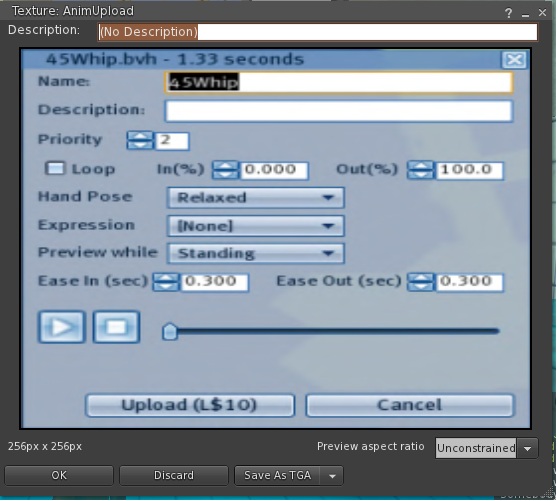
There are seven levels of animations that I am aware of currently in SL: 0, 1, 2, 3, 4, 5 and 6. The higher the number means the higher the priority. The animation priority (through 4) is set when the animation is uploaded to SL from an external animation file of the type .bvh. A set of choices is made by the person uploading the animation as shown in the picture below:


Most internal SL animations are below 2. These are standard things like the SL waddle, laughing, waving, flying, etc.  Most animated poses are set at level 2. Most dances are set at level 3. The animation that your avatar uses when you go to Appearance is priority 5. Priority 6 can be made through a hacking process and is not recommended.

If you dance using only your HUD, generally you do not have to think about animation priority. The way the HUD works is you dance using only one animation at a time. When you click to dance a different dance, like going from swoon to Sultry Down Body, the HUD stops swoon and starts Sultry Down Body. The Huddles HUD can run only one dance at a time.

=====


RUNNING TWO ANIMATIONS AT ONCE

Once in a while  you may add someone to your HUD and they seem to sometimes dance strangely with jerky movements on some dances or dancing when no one else is dancing. What usually has happened is that the person was dancing on a Dance Ball and then accepted your invitation to dance. Two animations are affecting the person at the same time. You can fix this by asking the person to stop the Dance Ball dance.

You can intentionally run two or more animations at once in a number of ways. Here are some ways to do it:

  1. Use two dance HUDS at one time
  2. Use a dance HUD and a Dance Ball dance at one time
  3. Use your HUD then open a dance from inventory and run it
  4. Run two dances from inventory at one time.

=====


DETERMINING ANIMATION PRIORITY LEVELS

You can view the UUID and priority of currently playing animations by selecting Advanced - Character - Animation Info from the menu, or Develop - Avatar - Animation Info on Viewer 2. This gives you information about every animation that your avatar is running. The dance you may be running is listed with the UUID number. If you run two animations at once, you see two UUID numbers.

=====


DANCE PRIORITIES IN ACTION

Get these three animations from the DANCE QUEENS Freebie Box:

90Whip - a Priority 4 head movement only
c-walk - a priority 4 dance
Boogie - a priority 2 dance

Put these animations to your inventory and let's see priorities in action. Double click all three animations from inventory to get three Animation windows each with a 'Play in World' button and a 'Play Locally' button. When you click the 'Play in World' button the animation starts.

First, let's look at how priorities work. Make sure all the dances are stopped. Start the boogie dance only. Hey, you are dancing an old favorite from pre-MOCAP days. Now, without stopping boogie, start c-walk. You stop boogie and dance c-walk. You can see from your information about priorities that two animations are running at one time, but you are dancing only one. This is because c-walk is priority 4 and boogie is priority 2. Your avatar dances the higher priority dance. OK, stop both dances. For you doubters, let's reverse the order. Start c-walk first, then start boogie. Again you dance only c-walk. Although boogie started after c-walk, you are running both animations and the higher priority is what you dance. Again, stop both animations.

Next, start 90Whip. Your head shakes in a no movement. Now, start c-walk and again you dance the nice freebie c-walk dance. Both 90Whip and c-walk are priority 4 animations, so when you run both at the same time, the last one started has priority. Stop both animations. Now, let's look at the reverse. Start c-walk  to dance. Then, start 90Whip. Hey, you are dancing c-walk with your head shaking a strong NO. You are dancing two animations at once.

This happens because an animator can make an animation affect all 23 joints in an avatar


or just some of them. If the animator chooses to affect only some joints, only those joints have the priority set for the animation. The others basically have no priority. When I made 90Whip this is what I did. I made the head movement a priority 4 and the other joints not affected. When the creator of c-walk (Live Gears) made c-walk, he chose to make all 23 joints a priority 4.

When multiple animations, for the same joint, are played at the same time the animation with the highest priority will be effective. If there are multiple animations with the highest priority, then the animation which was started most recently will be effective. In other words, when a new animation is started, each joint is looked at for the priority. If you are running a 4 priority dance like c-walk then start an anim like 90Whip with only the head at priority 4, all the joints except the head dance c-walk and the head uses 90Whip.

=====

xxxx
Nottoo


Hacking to Animation Priority 6


Hacking to Animation Priority 6


This is NOT recommended. I got this info from an SL animator.

=====

Method 1

  1. close Second Life
  2. open Second Life/skins/default/xui/en-us/floater_animation_preview.xml in a text editor
  3. modify this section:  
    label="Priority" label_width="50" left="10" max_val="4" min_val="0"
    name="priority"
    tool_tip="Controls which other animations can be overridden by this animation."
    width="90" />change max_val="4" to desired maximum animation priority level
  4. upload your animation normally, choose desired priority level


=====

Method 2

  1. close Second Life
  2. open Second Life/app_settings/anim.ini
  3. add this section to the top:[GLOBALS]
    priority = 6 (or other desired value)
  4. upload your animation normally, choose desired priority level

=====

Method 3

  1. download the modified qavimator created by Zwagoth Klaar.
  2. Create an animation and save it in the .anim format
  3. polish it using his AnimMaker tool
  4. upload it using Emerald Viewer's bulk upload (Or Zwagoth's uploader patch)

=====

For methods 1 and 2, you may run into a windows permissions error preventing you from modifying the file in question. You can get around this by running your notepad as an administrator (right click > run as administrator), or by copying the contents of the file in question into a new one, then delete/swap the old one out.

What needs testing is whether the server can handle all animation priorities on all joints, whether the various viewer mods posted above have any pitfalls or shortcomings, etc. It would be nice to hear from a Linden whether the server has any issues with higher priority animations. To help new animators, it might also be wise to add some guidelines in the uploader in the form of tool tips for what would be an appropriate priority level choice for certain types of animations.

xxx
Nottoo

Navigating in Your Huddles HUD


Navigating in Your Huddles HUD 111002


THE ALL BUTTON

When  I started dancing in SL using the Huddles HUD, I did not use a notecard. I simply used the All button. This listed all of my dances in alphabetical order. What fun :-)

=====


NOTECARDS FOR DANCES

The ALL button was sufficient until I got to about 50 dances in my HUD. At that point I learned about Notecards and how they allow you to arrange your dances in order. WOW! What an improvement. I could put the dances in the order I wanted and began to think about how to arrange them.

This led to arranging dances by speed. It also led to thinking about how to transition from one dance to another and what to do when the music stopped. My early Notecards looked something like this ...

Sultry Down Body
SLOW
stripper
strippers2b
strippers2c
swoon
danish
dip me in chocolate
crimson breeze
rythm6
Sultry Down Body
SLOW
erotic dance12b
Abranimations - Soft Wiggle
Slow_Seduction
Seduction 1|27|Sultry Down Body|2.2|Seduction 2
Sexy Dip - Abranimations
Sexy Bend - Abranimations
MDHUupdnHBD|12|Dance46|7|Dance38
rythm6
Sultry Down Body
MEDIUM
dizzy orchid
grinding nutmeg
precious morning
milk and honey
crystal roses
firefly
honeysuckle
rythm6
Sultry Down Body
MEDIUM
red chilli sheen
flaming sambuca
carnival
gimme gimme gimme
caramel|25|Sultry Down Body|2|Spirited Twirl - Abranimations
strawberrys and cream
jumpin
rythm6
Sultry Down Body
FAST
Abranimations - Clubbers 8
LETSGOCRAZY by OWENIMATIONS
I am on fire
this joint is jumpin
flapper
crazy legs
orange squash
rythm6


In this notecard I arranged my dances in order from slow to medium to fast. I put my transition dance, Sultry Down Body, on each page in the first slot (lines 1, 11, 21, etc), the speed on the second slot (lines 2, 12, 22, etc), and my waiting dance, rythm6, in the bottom slot at each page (lines 10, 20, 30, etc)

=====


NOTECARDS WITH SEQUENCES

When I got to about 200 dances in my HUD, I began to realize that I could not click through the 20 or so pages fast enough to easily switch between dances. This led to learning how to make sequences of dances that I often used together. A sequence is described in other DANCE QUEEN notes and looks something like this:

stripper|42|strippers2c|81|Sultry Down Body|1.8|swoon|45.5|danish|37|crimson breeze|25|dip me in chocolate|29|swoon|45.5|danish|23|Sultry Down Body|2.2|strippers2c

At first I used both individual dances in a Freestyle mode and a sequenced mode. As my number of dances grew, I realized that I had to start using only sequenced choreography and removed the individual dances from my main notecard. There are just too many pages to click through otherwise.

=====


ANOTHER SOLUTION OR THREE

Now, with the number of sequences approaching 325 and well over 4000 dances in my HUD, I am finding that another improvement in navigation is needed.

There are three ways to do this:

  1. One is to use separate notecards and navigate among them. With the Huddles HUD this means that I stop dancing while the new notecard loads. With large notecards this can take several minutes, which is not a good general solution. Other HUDs, e.g. Fleursoft, have much faster notecard switching and alleviate this problem.
     
  2. Another option is to use the feature of Huddles that lets you find a macro by entering in chat '/99n name of macro.' A macro is any dance sequence that uses the [NAME] macro, for example, Dance Sequence 120. Since I named Dance Sequence 120 in my notecard as 'Urban Killer' this lets me simply type in chat the following:
     
    /99n urban killer
     
    With this approach I can make a separate notecard listing all my Macros and copy and paste into chat. I can leave the HUD on one page, for example my page of Waiting Dances Between Songs. The notecard can be open and minimized in the lower left of your screen, then maximized when needed. Here are what some entries in the notecard might look like:
     
    SLOW DANCES
    /99n DD Slow
    /99n Heat Wave
    /99n SLOWnWET
    MEDIUM DANCES
    /99n Urban Cool
    /99n Urban Killer
    /99n Pearl's a Singer
     
    Each line represents a macro in my active Huddles Notecard.
     
  3. A third solution is to use two HUDs at one time. I wear one in the upper left and one in the upper right (in the Firestorm viewer).
=====


MORE ORGANIZATION

The more I dance the more I realize that there is a lot more than speed that I use to decide which sequence to play with a song. I use something that I call feel. You may use other terms. Feel to me is like the strength of the beat. I defined three categories of feel: soft, moderate and hard. So I combined this with speed to get more categories in which to place my sequences, for example, MEDIUM-SOFT, MEDIUM MODERATE, MEDIUM-HARD. Of course there still are special categoreis like Macarena or Line Dancing or Rap, but for the vast majority of songs, this additonal categorization lets me do a better job of quickly choosing just the right sequence when I hear a song.


=====


NOTECARD CAPACITY

Although I use dance sequences almost exclusively for dancing in clubs, I still keep a long list of individual dances in a notecard. These are the dances that I plan to put in a sequence someday. I have the individual dances categorized as described above. Unfortunately, the maximum size of a notecard is 65,536 bytes, so, if you have a really big main notecard like I do, you have to put your dances for development on a separate notecard from the dances that you use regularly.

=====


If you have more ideas about navigating in your Huddles HUD, let me know.

xxxxx

Nottoo

Saturday, October 1, 2011

" LES MILLE ET UNE NUITS D'EDIKA "


LA GALERIE DES MACHINES
PARIS 1900
LE JARDIN DE PARIS
DX EXCHANGE
&   
EDIKA CRÉATIONS
                                                                               
Present
                                                                                                   
Every first Tuesday  of every month in English
Every last tuesday of every month  in French
21h précises. Heure Française (French time). - 12 pm SLT
                             
+*✰*.¸.•*(¸.•*´♥`*•.¸)`*•.¸.+*✰*+   
                                                        
"  LES MILLE ET UNE NUITS D'EDIKA  "
" THOUSAND AND ONE NIGHTS OF EDIKA "


NEXT EXHIBITION : TUESDAY, OCTOBER 4 th


In the heart of the magnificent and quite sparkling  new Music Hall " the Garden of Paris", a fantastic story will be told.  A poetic and charming world where geniuses and beauties cross themselves because "  once upon a time, in distant parts of the country, very beautiful young  princesses..... " ect


But we shall not say  more about it,  to keep the mystery of this musical journey in the land of the fairies in which  the artists of the Garden, Elize Meili, Darcy Mokeev, Olympes Rhode and Penbelo Beaumont, await you.

Come to travel in the magic of these wonderful and different parts of the countries and t share with all the troop its happiness to dance with us.

Note concerning the organization :  so that the show would take place in the best possible conditions to avoid lag,  and by respect for the public, the entrance  will be made only on reservations. You just will have to give your name before entering to either elize, Olympes or Darcy . As the theater will  only be  accessible to the Galerie des Machines 's group , you'll be invited to join, or take it at the entry.  During the presentation, please Turn off your Aos and mind the rendering cost.  Thank you for your understanding. :-))
The theater will be open 22 minutes before the show, with great arabian music. (Arabia today)


Au cœur du superbe et tout rutilant Music-Hall " le Jardin de Paris",  une histoire fantastique  vous sera contée.  Un monde poétique et enchanteur où les génies et les belles se croisent car " Il était une fois, dans des contrées lointaines, de bien belles princesses....."

Mais chut !! nous ne vous en dirons pas davantage, pour ne pas déflorer le mystère de ce voyage musical au pays de la féérie auquel vous convient les artistes du Jardin, Elize Meili, Darcy Mokeev, Olympes Rhode et Penbelo Beaumont.

Venez voyager dans la magie de ces contrées merveilleuses et dépaysantes et partager avec toute la troupe leur bonheur de danser  avec nous.

Embarquement sur le tapis volant du jardin de Paris ici !
Notez concernant l'organisation : afin que le spectacle puisse se dérouler dans les meilleures conditions possibles (lag) et par respect pour le public, l'entrée se fera uniquement sur réservation. Vous étés donc invités à vous inscrire auprès des artistes et d'accepter l'invitation au groupe "Gallerie des Machines" ou de le prendre à l'entrée.  Une fois sur place, coupez vos AOs et  sureveillez votre rendering cost. Sinon, il faudra choisir entre les costumes du show et les vôtres. Merci de votre compréhension. )))
La salle est ouverte 22 minutes avant le show, avec la fantastique musique de Arabia today : le traditionnel d'aujourd'hui !!!


Friday, September 30, 2011

Finding Your First Dances

Finding Your First Dances 111001


When you first start dancing in SL with your Dance HUD, you need dances. Of course, there are free dances and the DANCE QUEENS Freebie Dance Pack, but you will want more. This means you will need to buy dances. The Dance Maker list is huge and helpful for finding dances you like.


If I were just starting to dance and I could only afford a few dances, here is what I would think about.


First, I would want dances that covered the speeds slow, medium and fast. Then, I would want only really well made dances (i.e. MOCAP) ... sexy, too. Of course, I would want a transition dance or use the free replacement called DQ001 (in the Free Stuff box), and I would want a waiting dance. If my budget were really constrained, I would buy mostly medium speed dances because most songs fit that speed

Here is what I would choose from:

SLOW
swoon - Sine Wave
danish - Sine Wave
Absynth_018 - Henmations
GOGO_N_004 - Henmations
My-SENSUAL-49 - MyAnimations

My-SENSUAL-78 - MyAnimations

MEDIUM
AKEYO_dance-NINA_03 - AKEYO
AKEYO_dance-NINA_02 - AKEYO
TAM01_Dance_AKEYO - AKEYO
m_dance_77 - Henmations
Katja-Dance_01_HUMANOID - HUMANOID
dream on - Sine Wave
shaken and stirred - Sine Wave
S4D_urban_250 - Studio4D
Buttweiser TIS - TIS
Envy TIS - TIS
VISTA-UrbanSexyDance01-25.7 - Vista

FAST
*Hotfoot - A&M
LENN01_DANCE_AKEYO - AKEYO
Yuss01_DANCE_AKEYO - AKEYO
My-R&B Dance-01 - MyAnimations
butterscotch - Sine Wave
shake and bake - Sine Wave
S4D_Body_229 - Studio4D

TRANSITION
Sultry Down Body - Abranimations or DQ001

WAITING
rythm6 - Djezebel


xxxxx
Nottoo

Thursday, September 29, 2011

Free or Low-Cost Dances

Free or Low-Cost Dances
There is a box of animations free in the Info Center under the video screen.

Some of the MOCAP dance makers offer free or low cost dances. Usually they are no copy, so you have to go to their store and find them. Here is the current list:

3FX
None

A&M
*Crackers*
*Crackers II*

Both dances are located at the landing point and are $1L each. Also members get free dances occasionally.

Abranimations
Monthly animation specials and holiday free dances.


Akaesha
At the main landing point you will find the Akaesha free REACT HUD. Wear the HUD and click the Dances button on the upper right. Take off the HUD and rezz it on the ground. Edit the HUD on the ground and select Edit linked parts. Click on the lower center of the HUD where it has dances. Inside are a lot of animations and some are pretty good. You can slide these from the rezzed HUD to your inventory. There are over 30 dances here as well as stands, sits and walks.

AKEYO
There is one free dance from the Ben series near the entrance.


MyAnimation
At the Customer Service desk there is a free HipHop dance.


Studio4D
HEYHEYHEY
HEYHEYHEY_2
4D_Chicken_Dance
These dances are located on the walkway to the new dance area.


There in Spirit
There is an animation stopper at the landing point.


=====

In addition to the MOCAP Dance Makers, here are some other free dance and animation sources that may be useful:

1. https://marketplace.secondlife.com/p/Bright-AO-Animation-overrider-with-facial-expressions-built-in-animations-and-more/268435
This is a HUD or two HUDs made by Bright Animations. There are some poses inside that you might like.

2. Tuty's Creations - There are free anims here or online at https://marketplace.secondlife.com/p/Tutys-Elite-Sexy-female-AO-free/646000
https://marketplace.secondlife.com/p/Tutys-AO-Lover-Male-Animation-Overrider-free/646001
https://marketplace.secondlife.com/p/FREE-SINGLE-DANCE-HUD-DANCE-FLOOR/645977
https://marketplace.secondlife.com/p/FREE-SINGLE-DANCE-HUD-PARTY/645978
https://marketplace.secondlife.com/p/FREE-SINGLE-DANCE-HUD-FUNNY-DANCES/645976
These five items have a bunch of dances. Some are  lousy , but others are okay. Just open the wearable hud and take the anims.

3. Baiastice - There are several free poses here including a couple of cute ones.

4. Kabuki Creations - There are free anims here or one is at https://marketplace.secondlife.com/p/Free-Reading-Pose-Oct08-Catalogue-Kabuki-Creations-pose-animations-cuddle/401618 - 1 reading while lying animation

5. https://marketplace.secondlife.com/p/Free-poses-o/1716359 -  18 static poses (no transfer)

6. https://marketplace.secondlife.com/p/Kaodashi-NG-pose-001/1558928 - 1 sitting pose

7. https://marketplace.secondlife.com/p/Vienna-Freebies-AO-V200-Edit-by-Holger-Gilruth/655610 - This HUD contains mostly static poses

8. https://marketplace.secondlife.com/p/CRUCIFIXION-POSE/1650435 -  1 crucifixion pose

9. https://marketplace.secondlife.com/p/FREE-BASIC-MERMAID-AO-V3-boxed/788142 - 8 mermaid animated poses (no transfer)

10. https://marketplace.secondlife.com/p/FREE-Nyokos-Bounce-On-Toes/169912 - 3 bouncing animations that may be useful

11. https://marketplace.secondlife.com/p/Lucis-Freebies-Bella-Pose-free-standing-pose/855508 - 1 static stand

12. https://marketplace.secondlife.com/p/Lucis-Freebies-Bom-Pose-free-standing-pose/855509 - 2 static stands

13. https://marketplace.secondlife.com/p/Lucis-Freebies-Megan-Pose-free-lying-pose/855510 -  1 static lying pose

14. https://marketplace.secondlife.com/p/AX-002-Basically-Boy-AO/2064112 - 18 male animated stands, 10 sits, 2 turns, 4 walks and more

15. https://marketplace.secondlife.com/p/JNMTs-Courtesy-Poses/363330 - 4 static poses that can be used as ending dances

16. https://marketplace.secondlife.com/p/aDORKable-Poses-Avi-Juggling/1081120 - 5 static poses for juggling

17. https://marketplace.secondlife.com/p/Cartoon-Kids-GIFT-Sync-Skating-Ball-for-10-avatars-boxed/1620021- group skating with 1 skating anim

18. https://marketplace.secondlife.com/p/Nihil-Free-Wash-Hands-Poseball-Box-Roleplay-Pose-Ball-BDSM-Fetish-Animations-Master-Gor-Freebie-0LD/1886615 - 1 wash hands anim

19. https://marketplace.secondlife.com/p/Goldenstar-Slowdance-Demo/1894291 - 1 freebie slow dance ... non-MOCAP and 2 lousy dances. The hand kiss is nice.

20. https://marketplace.secondlife.com/p/promocion/1793914 - 1 static couples kiss pose

21. https://marketplace.secondlife.com/p/FREEBIE-FULL-PERM-MODEL-POSE/1331448 - 1 static model pose

22. https://marketplace.secondlife.com/p/LAMU-HOVERING-ANIMATION-by-Su-Voir-and-MrS/1860277 - 1 hovering animation

23. https://marketplace.secondlife.com/p/ImpEle-Casual-Girl-AO/1924292 - 5 animated stands, 2 sits and a walk

24. https://marketplace.secondlife.com/p/ImpEle-Chubby-Girl-AO/1924303 - 5 animated stands, 2 sits and a walk

25. https://marketplace.secondlife.com/p/FAA-009-AO-F001/1014445 - 1 bad kick anim

26. https://marketplace.secondlife.com/p/Zambooki-Gift-Couples-Air-Animation-Airplane-Game/1733497 - 1 cute couples air dance. The female part can be used individually.

27 . https://marketplace.secondlife.com/p/FAA-004-Kick-Attack/1014454 - 16 anims for stanidng to sitting, but they are pretty stiff

28. https://marketplace.secondlife.com/p/primavera-sit-pose01/1794746 - 1 sit pose

29. https://marketplace.secondlife.com/p/Female-AO-Starter-Kit/209609 - 3 female stands and 2 sits

30. https://marketplace.secondlife.com/p/Bossy-Pose-Free-Gift-from-DarkHeat-Designs/191805 - A cute static couples pose

31. https://marketplace.secondlife.com/p/FREE-GIFT-LOST-WORLD-POSE/1368616 - 1 static pose

32. https://marketplace.secondlife.com/p/MirokuLovely-AO-V10-Simple-FREE/834437 - 2 stands, 3 sits and flying anims

33. https://marketplace.secondlife.com/p/Male-AO-Starter-Kit/209610 - 3 male stands and 2 sits

34. https://marketplace.secondlife.com/p/Boudoir-Rouge-FREE-POSES/255150 - 3 static poses

35. https://marketplace.secondlife.com/p/FREE-Poseball-Roboto-animation-by-goodstuff/927034 - 1 not very good robot anim

36.  https://marketplace.secondlife.com/p/Ssi-Crawl/204011

37. https://marketplace.secondlife.com/p/MMD-Nostalogic-motion-files/2810598 - a free mikumiku dance

Please send additions and corrections to me.
Web Sass

Sequenced Choreography

Sequenced Choreography 110929


Dancing in SL is fun and even more fun when the dances fit the music and the dances are sexy and fun. Choreography is a way to stitch together dances to make a Dance Sequence that really is hot.  There are two ways to do choreography. One is to do choreography by switching dances during a song (Freestyle Choreography). The other is to make Dance Sequences (Sequenced Choreography) and click at the beginning of the song. This notecard tells you how to do Sequenced Choreography.

=====

WHAT YOU NEED

To choreograph dances you need five things:
1. A Huddles EZ Animator Delux or Fleursoft HUD. If you have the Huddles Basic, it will not work.
2. A selection of dances to choose from for the sequence. These dances need to be in your HUD.
3. A Choreography Grid - Although the Choreography Grid is optional, it really helps you see your location when matching dances. The Choreography Grid is in the Free Stuff box.
3. Attention to detail
4. About one hour


=====

AN OVERVIEW OF HOW TO DO SEQUENCED -CHOREOGRAPHY

Choreography is stitching together several dances to create a pleasing dance sequence. A well choreographed dance makes the dancers look and feel like they are actually dancing to the song matching the rythm and the feel of the song

The Huddles EZ Animator Delux or Fleursoft allows this by using Notecards. Choreography is a process of selecting dances and fitting them together so that they look smooth when transitioning from one to the next and the whole matches.

Today, we will cover all of the steps necessary for you to be able to choreograph. For the class today we will use five dances:

1. f_dance_20 from henmations
2. cherry pips from sine wave
3. f_dance_26 from henmations
4. f_dance_06 from henmations
5. Sultry Down Body from Abranimations

You do not need those dances today. Instead, I will add each of you to my HUD so you can see each step of the process. Please accept my invitiation to dance. Also hop on a pose ball on the dance circle to make it easier to see.

Sequenced choreography is either for a specific song or for a specific speed of song. When it is for a specific song, you can almost exactly match the dances to the song. Dance groups that perform use sequenced choreography for this purpose. The more common use is for matching the tempo or beat of a song, which is usually slow, medium or fast, but can have additional divisions. For example, I use eight.

In this class we will make a sequence for a specific tempo, but the process is the same for a tempo or a specific song.

=====

SELECTING DANCES

The first step is to identify the dances that you want to use in your sequence. When I am making a sequence I consider three things:

1. I use only good dances. They can be looped, which means that they repeat themselves, or non-looped. I usually don't use poorly made dances or dances that end in a different place than where they start. Let me show you a bad dance. This is 5mokolo. It is looped but jumps when it repeats itself.

2. I decide what speed of dance I want. Usually, I use dances that are all the same speed in a sequence. I look at speed as slow, medium or fast. Occasionally I will mix speeds but not normally. Categorize your dances into these three speeds. Let me show you three speeds. First is slow with the dance "swoon". Next, is a medium speed dance "f_dance_20". Last is a fast dance "let me think about it". These divisions into slow, medium and fast are arbitrary but useful.

3. I also decide if the dance will be a specialty dance. For example, a break dance is a specialty dance. Here is a break dance, "AKEYO_dance_BEN_break01". So is a Spanish dance like "farruca". This requires looking at the dances and deciding if they are general or specific.

Once I have selected the dances I play them to be sure that they go together. Let me play each of these dances.

1. f_dance_20 from henmations
2. cherry pips from sine wave
3. f_dance_26 from henmations
4. f_dance_06 from henmations
5. Sultry Down Body from Abranimations


We will make a Dance Sequence from these 5 dances.

The easiest dances to put together in a sequence are those made by the same Dance Creator from a series produced by that Creator. Dance Creators often will place similar dances together at their store. Making a sequence of dances from different creators is more difficult, so for your first sequence stick to dances from the same maker.

=====

USING THE CHOREOGRAPHY GRID

Hop on the pose ball in the middle of the Chroreography Grid. This places you at the center in a standing position. The grid is designed so that you can see what your position is and is very useful for matching dances. When matching dances you switch from one dance to another and need to minimize the distance between the switching point of one dance from the beginning of the next. There are several variations of the Choreography Grid, so use the one that you liike best.
=====

TIMING DANCES

The next thing I do is time the dance. By this I mean how long the dance goes before it repeats. I took a list given me by Cheryl Nitely and have added to it. I send it out with revisions occasionally to DANCE QUEENS members. Let me give each of you the current Dance Times list. You can see it lists the dances in alphabetical order. Each dance has its name spelled exactly right followed by the "|" symbol then a number and the "|" symbol again. For example, f_dance_20|20| means that the dance f_dance_20 is 20 seconds before it repeats itself.

If the dance is not listed or the time is not indicated, you have to time the dance. This usually is easy to do. You watch a dance and you begin to see the same pattern repeated. Most dances are 15 to 30 seconds long. To get an acurate length of time I start the dance and time it with a watch or stopwatch.  Recently, I have used the online timer at http://www.online-stopwatch.com/. The maximum length of one animation in SL is 30 seconds.

Let me show you f_dance_20. First, I will restart it about five times so you can see the beginning. I watch the movement or where I am standing to be sure where the beginning is. Now I will run through the sequence and stop as soon as I see it repeating. Let me do it again.

Alternately i find a place in the sequence that is easy to spot and time from there until it repeats. In f_dance_20 a good spot would be when your right knee touches the ground.

=====

MATCHING DANCES

To match dances I decide the sequence I want to use. Matching involves deciding not only the order of the dances, but where to switch from one to the other. Most dances start out where you are standing and face the front. Let me show u "f_dance_20" again and watch where it begins versus where you are standing. Also notice the direction you face. Let me show you an example where the dance actually starts in a different place. This is "red chili sheen" and it actually begins by jumping back. I will restart it several times so you can focus on your feet. Here is "weloveyou-girl" which starts facing right instead of forward. I will restart it several times.

When matching you also want to think about your arms and legs. Some dances fit together very well. Here is how "crimson breeze" and "dip me in chocolate" fit together. First, let me show you "crimson breeze". Now i will show you "dip me in chocolate". Do you see in crimson breeze that the right arm is in the air at  one point. Similarly, in dip me in chocolate you see the same thing. This is a good place to transition.

So you do the best you can to match the dances. This determines the order and the transition point. If I cant find a good transition point, I insert Sultry Down Body. It is a two-second, non-looped dance that is good for transitions.

Usually I use three dances at a minimim for a sequence. Sometimes I use more. With three you can repeat and in a three-minute song there is not too much repetition.

=====

CREATING THE SEQUENCE

Usually, I create the first try at a sequence by using the repeat times for a dance. I put the dances in the order I have selected. For example, the sequence I chose was this:
f_dance_20|20|f_dance_26|19|f_dance_06|18|cherry pips|20|f_dance_20|20|f_dance_26|19|f_dance_06|18|f_dance_20|20|f_dance_26|19|f_dance_06|18|f_dance_20|20|f_dance_26|19|f_dance_06

This means the the dance starts with "f_dance_20" and it plays for 20 seconds. The next dance starts after 20 seconds and is "f_dance_26" and it plays for 19 seconds.

You can see I chose to play "cherry pips" only one time. I did this because I wanted to have on the ground movement only one time. Other than that I decided to just repeat the order for the other three dances. You can also use the [REPEAT] command to repeat the sequence.

What I have created is a pretty good sequence. In fact, I would use it. But, some of you may have noticed that there were small jumps between some dances. This leads to adjusting the dance.

=====

ADJUSTING THE SEQUENCE

One of the more noticeable places where a jump occurred was between the third dance "f_dance_06" and "cherry pips".

Let me show you that part of the sequence just f_dance_06|18|cherry pips|20|. Watch the transition.

It felt like the dance should have switched maybe a second earlier. So here is the same section with one second off the timing of "f_dance_06" so the section is now f_dance_06|17|cherry pips|20|. Watch the transtion.

It looks better. You can set hundredths of a second if you want. Most dances are at 30 frames per second so one frame is 0.03 seconds.

You can do this adjustment with every transition. You can use Sultry Down Body if the dances are very different.

Sometimes you cannot achieve perfection and you just have to accept a slight jump between dances.

=====

PUBLISHING THE SEQUENCE

Now we have our adjusted sequence:

f_dance_20|20|f_dance_26|19|f_dance_06|17|cherry pips|20|f_dance_20|20|f_dance_26|19|f_dance_06|18|f_dance_20|20|f_dance_26|19|f_dance_06|18|f_dance_20|20|f_dance_26|19|f_dance_06

You put this in your HUD on one line. When you do that the HUD shows it as only the first dance, in this case "f_dance_20" but it is your sequenced dance. If you want to name the sequence you can use the [NAME] command.

If you make a sequence, send it to me. I will try it and publish it to all of the members of DANCE QUEEN.

This ends the class. Any more questions?

Have fun with your Sequenced Choreography!!

Nottoo Wise
DANCE QUEENS

MyAnimation Dance in the Moolto Hunt

Ramona Criss told me that a free MyAnimations dance that has never been sold is part of the Moolto Hunt. Details are here at the My Animations store.

Buying A Dance System

Buying A Dance System 110924


Dance Systems provide couples and individual dance balls in clubs and homes. This notecard contains a comparison of the two most popular systems and includes recommendations for which system you should purchase.


For most users the TIS Hybrid Dance Machine is the recommended product. Details are included below.

==========

PROCESS
The process for comparing dance systems was:
1. Develop criteria for analyzing the dance systems.
2. Analyze each dance system relative to the criteria.
3. Make Conclusions
4. Make Recommendations


==========

CRITERIA
Six criteria were identified:
I. CAPACITY
II. SYSTEM SET-UP
III. USE OF SYSTEM
IV. OPTIONS
V. PRICE AND AVAILABILITY
VI. HELP

Within each criteria specific characteristics were defined.

==========

ANALYSIS
Two systems were analyzed: The INTAN System and the TIS Hybrid. The analysis is included  in this notecard:
http://sldancequeens.blogspot.com/2011/09/dance-queens-sim-dance-system-analysis.html

==========

CONCLUSIONS
Based on the above Analysis a comparison of the two Dance Systems was made for each criteria.
I. CAPACITY
Both Dance Systems have sufficient capacity for both dances and number of dancers for almost all clubs and home users. The one exception is those with huge dance collections. For those people the INTAN offers somewhat more capacity for dances.
II. SYSTEM SET-UP
The TIS System is considerably easier to set up than the INTAN system. There are people who will set up the INTAN system for you, but this adds to the cost. The TIS System also makes listing your dances simple so you can easily avoid buying the same dances twice.
III. USE OF SYSTEM
The TIS System is somewhat easier to use than the INTAN. Both offer a HUD which simplifies use of the system.
IV. OPTIONS
Each has some advantage on options. The INTAN allows for ordering the dances listed in the menu. The TIS Hybrid is copyable and multiple versions can be used on the same sim, for example, if you want to put dances in one and sex or cuddle anims in another.
V. PRICE AND AVAILABILITY
The two systems are priced about the same. The System price is modest compared to the price of the dances that the owner will need to add to the system.
VI. HELP
The TIS Hybrid offers a slight advantage in terms of updating.

==========

RECOMMENDATIONS
Both systems do a good job of providing dancing in clubs and homes. These are the two best systems I have seen. For most users (Clubs and Home) I recommend the TIS Hybrid System. It is much easier to set up and more user friendly.
There are a few exceptions. If you already have an INTAN and know how to maintain it, I recommend keeping it and not switching. If you have a huge dance collection of hundreds of couples dances and individual dances, you might consider the INTAN or using two TIS Hybrids.

==========

For comments and corrections, please contact me.
xxxx
Nottoo Wise
DANCE QUEENS is for sharing dance information.

Tuesday, September 27, 2011

DANCE QUEENS - Sim Dance System Analysis 110917

DANCE QUEENS - Sim Dance System Analysis 110917

Most Dance Queens members use the INTAN system in their club or home as the system for controlling their couples dancing. Many also use the INTAN as the individual dance ball. This system became available in 2008 and swept through SL removing pose balls from clubs and homes.

I have developed a set of criteria for comparing Systems so that advanced dancers like us can both select the best System and provide feedback to System makers. I have identified what I think are the most important attributes that a System needs. This is listed below. If you have additional criteria, please let me know.

There are a number of dance Systems available. If you would like to participate in the testing of them, please let me know. Once Systems are tested, we will provide this information to all DANCE QUEENS members and the Dance Systems makers.
xxxx
Nottoo

================================

WHAT IS IMPORTANT IN A DANCE SYSTEM

Dance Systems are used differently by different people. The list below are all the criteria for Dance Systems. For any person some categories may be essential and others unimportant. The list is developed with the name of the category followed by the ultimate capability.

Below is the current analysis of Dance Systems. The Systems are:
1. INTAN System - Couples, Feminine and Masculine Dance Balls - by Nottoo Wise on 110831
2. TIS Hybrid Dance Machine - by Nottoo Wise on 110905

*****

I. CAPACITY

A. MAXIMUM NUMBER OF DANCES IN THE DANCE SYSTEM - UNLIMITED
Currently there are about 200 MOCAP couples dances and thousands of MOCAP individual dances in SL.
1. INTAN System - The maximum number of animations known in a properly working INTAN is 160 couples, 422 female and 50 male dances.
2. TIS Hybrid - The test was with 7 couples and 350 female dances and the Dance system worked properly. At 650 individual dances the Dance System did not work (Stack Heap).

B. MAXIMUM NUMBER OF DANCERS DANCING SIMULTANEOUSLY - 100
The most avatars I have ever seen on one sim at a time is 94.
1. INTAN System - Defaults are 15 couples, 30 female and 30 male simultaneously.
2. TIS Hybrid - Default is 50 people dancing with potential expansion to 100.

*****

II. SYSTEM SET-UP

A. EASE OF SET-UP - VERY SIMPLE
Set-up of the system is done by rezzing an object.
1. INTAN System - Requires rezzing of the couples dance ball, female dance ball and male dance ball. Dances are then added to the dance balls using the edit function. The Couples Dance Ball requires adition of notecards and can involve detailed notecard editing to get the desired menu order. It is not a simple process.
2. TIS Hybrid - the set up process is relatively simple and involves rezzing the dance ball, adding the dances in a manual or semi-automated process and making adjustments to the dance names. It is a relatively simple process.

B. DANCE LOADING PROCESS - AUTOMATIC
Select a folder and all the contents are loaded automatically.
1. INTAN System - Dances area added one at a time if non-copy or in bulk if copy. Most couples dances are non-Copy. Adding is done by drag and drop. Dances must first be taken from a pose ball or purchased in 'INTAN-Ready' form.
2. TIS Hybrid - Two ways are used. One uses a script added to the pose balls. Two uses drag and drop and works fine.

C. NOTECARD LOADING (If used) - AUTOMATIC
Notecards are automatically created when needed.
1. INTAN System - Notecards are created outside the Couples Dance Ball and added. Notecards must be gotten from the INTAN website and requires registration. Customized notecards can be made but it is a very complex process. Notecards are added to the INTAN Couples Dance Ball by drag and drop. Notecards are not required for the Female and Male Dance Balls.
2. TIS Hybrid - No notecards are required. A relatively simple process for managing the dances is done through the TIS website.

D. DANCE LIST - AUTOMATIC
A listing of the Dance Ball's contents is made automatically when needed. This is important to have when shopping for new dances.
1. INTAN System - The only way to make a list of dances is to edit the Dance Balls and make a manual list from the dances displayed.
2. TIS Hybrid - The dance list is displayed on the website.

E. ACCESSING DANCES - AVAILABLE SIM-WIDE
Dancing should be available sim-wide
1. INTAN System - Dancing can be initiated sim-wide either from the Dance Balls or from 'Dance Anyplace' objects.
2. TIS Hybrid - Dancing can be initiated sim-wide either from the Dance Ball or from Calling Posts

F. NUMBER OF PRIMS IN SYSTEM - ZERO
For users who are prims short the Dance System should have as few prims as possible.
1. INTAN System - 3 prims for the Dance Balls and 2 prims for each 'Dance Anyplace' object.
2. TIS Hybrid - 3 prims for the Dance Ball and 2 prims for each Calling Post

*****

III. USE OF SYSTEM

A. STARTING TO DANCE - VERY EASY
Ideally one click should be enough to dance.
1. INTAN System - One click on the Couples Dance Ball rezzes two pose ball. Each dancer hops on a pose ball and accepts the invitation to dance. This starts the couples dance and brings up a menu of dances available with 6 dances on the first page and 9 on subsequent pages. One click on the female or male dance ball gives an invitation to dance. When the invitation is accepted dancing begins and a menu appears to select dances.
2. TIS Hybrid - One click of the Dance Ball give a menu to choose Couple or Individual dancing. Choosing couples gives two rezzed pose ball that the dancers hop on then a menu listing the dances appears to select dances.

B. CHANGING COUPLES DANCES - VERY EASY
If all dances are not visible at one time, then the fewest clicks possible to start a dance is desirable.
1. INTAN System - Varies from 1 to many clicks depending on the number of dances in the Dance System. The dance list is not looped.
2. TIS Hybrid - Varies from 1 to many clicks depending on the number of dances in the Dance System. The dance list is not looped.

C. SYNCING DANCES - AUTOMATIC
Syncing should be automatic or as few clicks as possible
1. INTAN System - Syncing without the INTAN HUD can take too many clicks since it is on the first page of the menu. Syncing with the HUD is one click.
2. TIS Hybrid - Syncing is done with one click by reselcting the dance or with the HUD or using /1 sync in chat.

D. FILTERING DANCES INTO GENRES - EASY
Dancers need to have a way for filtering dances by genre (e.g. tango, slow)
1. INTAN System - The INTAN Couples system uses a filter accessible either through the pop-up menu or through the HUD. Several clicks are required to filter and the interface is not intuitive. Most dancers are not familiar with this feature and do not use it. No filtering is available on the individual Dance Balls.
2. TIS Hybrid - Easily performed via the dance setup website. Up to 10 genres per couples/singles dances are allowed. Simply entering a new genre name next to a dance creates that genre.

E. GROUP DANCING - EASY
Dancing as a group in sync is a desirable feature.
1. INTAN System - The INTAN Couples system uses a group dance capability accessible either through the pop-up menu or through the HUD. Most dancers are unfamiliar with this feature and do not use it. No group dancing is available on the individual Dance Balls.
2. TIS Hybrid - The system allows 3 dance modes per couples/single dances - via menu, sync'd and random. When set to sync'd the owner can choose one dance or one genre and all dancers automatically sync when starting to dance. The time to transition to a new dance (if a genre is selected) can also be controlled via the owner menu.

F. RANDOM DANCING - EASY
Setting the system so the the dances are done randomly for a set period is a desirable feature.
1. INTAN System - The INTAN Couples system uses a random dance capability accessible either through the pop-up menu or through the HUD. One click is all that is needed to activate this feature. No random dancing is available on the individual Dance Balls.
2. TIS Hybrid - The system allows 3 dance modes per couples/single dances - via menu, sync'd and random. When set to random the owner can choose one genre or all genres and all dances automatically start a random dance from that selection when starting to dance. The time to transition to a new dance can also be controlled via the owner menu.

G. DANCE HUD - AVAILABLE AND USEFUL
A menu or HUD needs to be available to control the dance selection and access features of the system
1. INTAN System - INTAN offers both a menu and an optional HUD for couples dancing. The HUD is intuitive although it is larger than it needs to be. The default position is the upper right. No HUD is available for the Individual dances.
2. TIS Hybrid - Both a menu and optional HUD for both couples andindividual dancing is available. The HUD is intuitive and has a minimize feature. The default position is the upper right.

*****

IV. OPTIONS

A. ALLOWS FOR WAITING DANCES - YES
When the music stops the couples or individual dancers should be able to easily go to a waiting dance.
1. INTAN System - No specific waiting dance capability is offered.
2. TIS Hybrid - No specific waiting dance capability is offered.

B. ALLOWS FOR THE COUPLE TO DANCE THE SAME DANCE- YES
Sometimes couples want to dance an individual dance in sync either facing each other or facing the same direction.
1. INTAN System - This capability can be achieved but requires a detailed knowledge of the notecard system
2. TIS Hybrid - No, but I understand that this is in the next edition.

C. ALLOWS FOR NON-DANCE ANIMATIONS - YES
Any animation (couples or individual) should be playable on the system
1. INTAN System - Yes. A listing of all couples animations is available to registered users on the INTAN website.
2. TIS Hybrid - Yes, although a waiting period may occur for the animation to be included in the TIS server if the dance is new to SL.

D. ALLOWS FOR HEIGHT ADJUSTMENT - YES
Couples dances should allow the male and female to independently adjust their height realtive to the floor
1. INTAN System - Yes, height adjust ment is done using the page up and down keys.
2. TIS Hybrid - Yes, height adjustment is done using the page up and down keys.

E. ALLOWS FOR MULTIPLE DANCE SYSTEMS ON THE SAME SIM - YES
Sometimes sim owners may want for example a Couples Dance Ball and a Couples Sex Ball on the same sim.
1. INTAN System - Yes this is possible with technical assistance.
2. TIS Hybrid - This is possible by changing the channel of the machine (by changing the dance machines description)

F. THE DANCE SYSTEM IS COPYABLE - YES
A copyable system allows the user to have multiple systems.
1. INTAN System - Not copyable.
2. TIS Hybrid - Copyable

G. ALLOWS DANCERS TO MOVE POSITIONS ON THE FLOOR - YES
Both couples and individuals sometimes want to change positions while dancing.
1. INTAN System - Couples cannot move while individuals can move.
2. TIS Hybrid - Couples cannot move while individuals can move.

H. ALLOWS FOR DANCES TO BE LISTED IN A DESIRED ORDER- YES
Sometimes, owners may want Dance Ball dances lited in a specific order.
1. INTAN System - Yes, for the Couples Dance Ball but requires a detailed knowledge of the notecard system. It is not possible for the Individual Dance Balls.
2. TIS Hybrid - No unless you want to rename the dances.

I. ALLOWS FOR SEQUENCED INDIVIDUAL DANCES - YES
Dance sequences are fun for individuakl dancers becasue they provide variety during a song or can be tailored to a song.
1. INTAN System - No
2. TIS Hybrid - No, but is included in the beta of the next version.


*****

V. PRICE AND AVAILABILITY

A. THE SYSTEM SHOULD BE THE LOWEST PRICE - FREE
The lower the price, the more people will use it for dancing
1. INTAN System - L2850 for the system (1850L for the Couples Dance Ball, 500L for each gendered Dance Ball) plus 100 for additional Dance Anyplace objects.
2. TIS Hybrid - L2495 for the system.

B. AVAILABLE EASILY - IN-WORLD AND MARKETPLACE
Full-perm would allow anyone to use it and access it.
1. INTAN System - Available in-world
2. TIS Hybrid - Available in world and on the marketplace

*****

VI. HELP

A. AVAILABLE HELP - 1 CLICK AND EASY TO USE
Detailed help should be available in-world.
1. INTAN System - Yes, help is available from the Dance Menu or online
2. TIS Hybrid - Yes, help is available from the dance menu directing to an online help.

B. USER FORUM - AVAILABLE
A user's forum should also be available.
1. INTAN System - Not avalable
2. TIS Hybrid - Not available

C. CUSTOMER SERVICE - HUMAN AND RESPONSIVE
An available expert should be available at all times.
1. INTAN System - Human help is available but not at all times
2. TIS Hybrid - Human help is available but not at all times

D. UPDATES - AUTOMATIC
Any updates are done automatically/
1. INTAN System - All updates so far have required manual intervention
2. TIS Hybrid - Updates require a prim to be dropped near the system and touched, from that point on updating is automatic.

*****

Nottoo
DANCE QUEENS